
How to view or switch your Personal Account type
Merchant AccountSettings & Extended ServicesWonder Mobile App 1 min read Created August 30, 2026 Updated September 30, 2026
Account type means your personal account’s nature (taxi / hawker / tutor / professional). It is not switching between Personal and a company.
For account safety, changing your Personal Account type is available only when certain conditions are met. You’ll be able to change it once the option is shown in the app.
View your type
- Switch to your Personal Account (Home header name → account list, or Business Directory → Personal).
- On Home, tap Merchant Account. You’ll see your Merchant Account Type at the first section of the page. Depending on your account status, you can see the card locked or granted access to switch the account type.
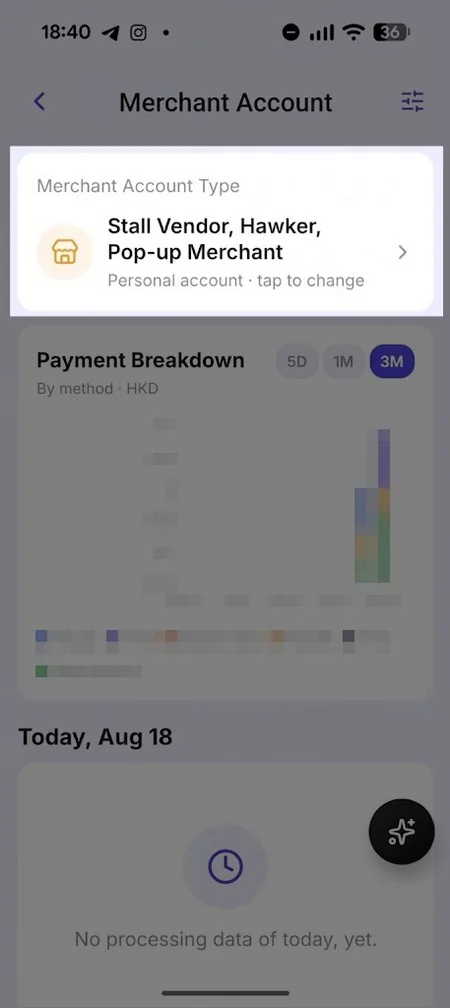
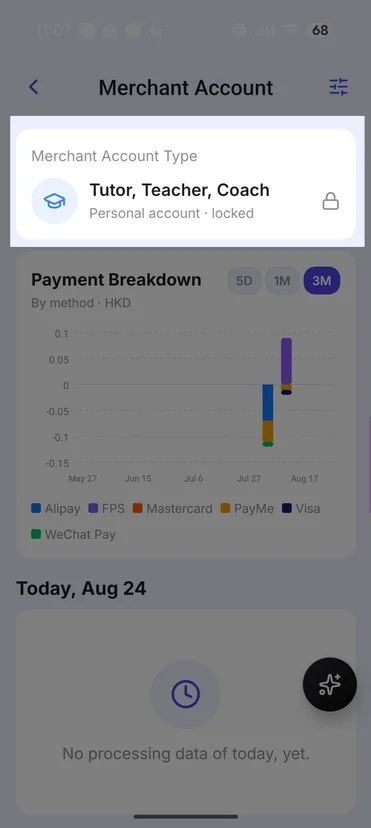
Change to another personal type
- On the Merchant Account Type page, select a different nature (your current one cannot be re-selected).
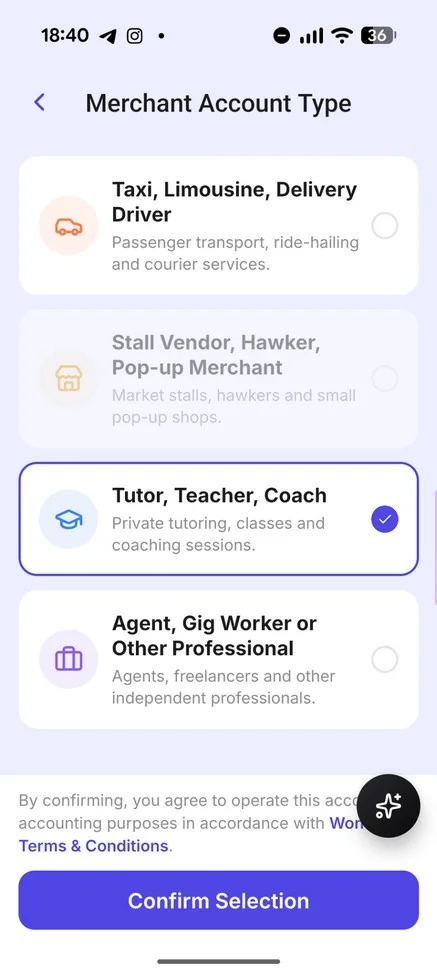
- Tap Confirm Selection to apply the change.
- The payment configuration and merchant account type will be updated on the Wonder App.
Notes
- A licensed Taxi Driver cannot change their type. Only other personal account types can change their type for now.
Did this answer your question?
If you still need help, our merchant support team is one message away.
Chat on WhatsApp